



How to Use Movie Streaming App for iPhone iPad
Watching movie is one of the most popular habits of people all over the world. We cannot imagine or calculate how many people watch movies every day on account of the countless means of watching movies. People watch different types of movies to kill time or broaden the minds, or for pleasure, or in pursuit of different life experiences.
Sometimes, people go to cinema to watch movies, but it takes time, money and energy, and the choice is unchangeable once the ticket is bought. Sometimes, people choose to watch movies on the internet, but it is difficult to find true HD movies and the movies often cannot be played smoothly. Therefore, more people download movies from some safe and reliable websites before watching. It can guarantee smooth playback of movies. However, it needs a lot of time and even takes CPU. What’s more, most movies are not compatible with iPhone and iPad in terms of formats. So I suggest a more convenient and ideal way - streaming movie with the help of a movie streaming app for iPhone iPad - Air Playit.
Why Choose Air Playit as Movie Streaming App for iPhone iPad?
1. With 320 different video/audio codecs built in, it is capable of streaming any movie to Apple iPhone, iPad, iPod touch and playing video almost in any format;
2. It is free;
3. App client especially for iPhone and iPad users;
4. Live conversion enables you to avoid endless conversion beforehand.
In general, Air Playit helps you stream movies and watch movies immediately through local and remote WiFi, 3G/4G network in a more relaxed way. The two components – the server and the App client enable you to stream movie to iPhone iPad anywhere.
The Process of Streaming Movies to iPhone iPad
Step 1: Download Air Playit server.
After free downloading, run the server. You can click "Add Folder" to import movies from your local hard drive of your computer or choose "movies" after clicking "Import iTunes Playlist" to import movies from iTunes playlist.
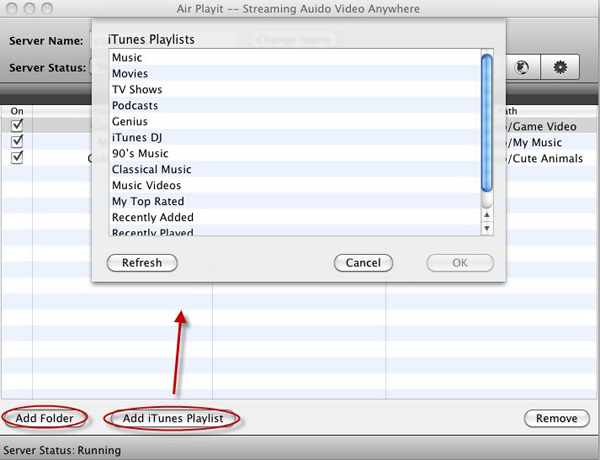
Tips: This iPhone iPad movie streaming app is applicable for all PCs and Mac. It is designed for both Windows and Mac editions.
Step 2: Download and install Air Playit App Client onto your iPhone/iPad.
Air Playit will automatically find the server by Bonjour Service. In case that the Bonjour connection is not found or available, you need to specify the server address manually.
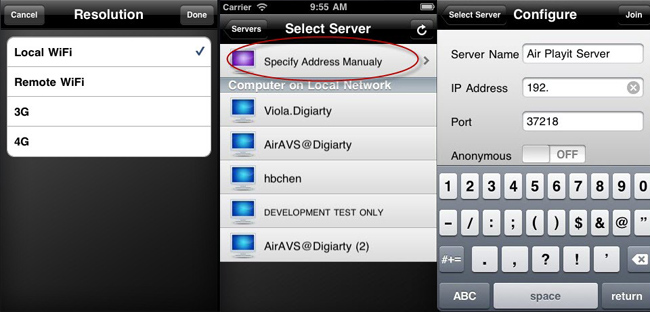
Step 3: Play the movie on your iPhone/iPad.
You can watch movies by streaming movies for iPhone iPad via WiFi, 3G/4G network, so you can watch movies on iPhone iPad immediately.
Tips: You can also download movies to iPhone/iPad. When the movie format is not supported by Apple devices, like MPEG, WMV, FLV, you need to perform the "Offline Conversion" task first so that you can play movies in case of no network connection.
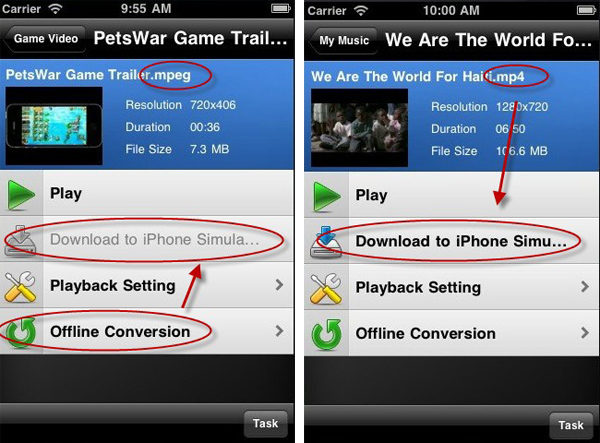
Air Playit acts as a cloud to stream both videos and audios. That is to say, besides movies, Air Playit can stream music for Apple iPhone iPad. It saves conversion time and storage space for you. Please go to http://www.airplayit.com/ to get more information of this software.
Recommended
MacX DVD Ripper Pro is a solid DVD movie ripper that effortlessly copies DVD to MP4, WMV, MOV, AVI, MKV etc. or to Android Samsung iPhone iPad Apple TV on Mac/PC with 36X faster speed and original video/audio quality, which makes it easy to stream the movie video to your iPhone iPad with Air Playit.
For Mac 

For Windows 

Related Article
Air Playit: The Most Popular Video Streaming App for iPhone iPad
Air Playit can stream videos in almost any format to iPhone, iPad and iPod touch. If the videos are not in format supported by iPhone or iPad, it will convert them on the fly.
How to Stream MKV HD Video to iPhone iPad
iPhone iPad fans can stream MKV HD video on the fly with Air Playit. It is a video streaming App for streaming MKV to iPhone, iPad running no CPU. Here is a detailed of streaming MKV HD video to iPhone iPad.
Streaming Video Audio to iPod - Change Traditional Video Conversion Way
Do you have an iPod touch? Air Playit can help you enjoy movies and music by easily streaming video audio to iPod without the need of waiting for conversion.

Top 5 Articles
* Top 3 Video Streaming Apps for iPad iPhone
* Access Movies from PC to iPad Wirelessly
* Video Streaming Software for Android Phone
Hot Search
Watch M2TS to iPhone, Stream MKV to iPhone, Stream MP3 music to iPhone, Streaming WMV to iPhone iPad, Watch AVI on iPhone, play MKV on iPhone iPad, streaming videos to iPhone iPad, streaming video to iPhone iPad, Streaming WMV video to iPhone iPad, free video streaming App, Remote access, WiFi Video on iPhone iPad, Air Playit Http server,Remote Video Streaming,streaming video audio to TV ,audio streaming software ,Transfer video