


How to Transfer Video over WiFi,3G and 4G Internet Network to Apple Devices
We are so attached to the Apple devices that we would love to play videos anywhere on the way to work, at KFC, in the airport etc. Sometimes, we also convert and sync the videos on Mac or PC to play with our Apple device, however, it is troublesome to convert the video to formats playable for the iPhone, iPad or iPod before when leave home.
Has it ever occurred to you that you do not necessarily need to convert and sync video from iTunes to play it on your Apple devices? Try an alternative way--transfer video over Internet, Wifi, 3G and 4G with Air Playit.
How Does Air Playit Transfer Video over Internet, Wifi, 3G and 4G to Apple Devices?
Air Playit has two components to transfer video jointly, namely, the Air Playit server and the client application. Air Playit server runs on your PC/Mac and the client application on the Apple devices. The server allows you to share video folder, set access permissions etc, and the client application get the video streaming from the server.
Air Playit can automatically discover the server on local network so that you can freely transfer video via WiFi or transfer video via 3G and 4G. Meanwhile, this free video streaming software also allows you to specify the IP address of your PC/Mac and transfer video over Internet at anywhere. Most importantly, all the video conversion is done on the fly so you can use Air Playit to transfer any video to the device and play the video instantly.
Steps to Transfer Video over Wifi, 3G or 4G Internet Network to Apple Devices
Before you transfer video to your Apple device, please make sure that your device is connected with Wifi, 3G or 4G Internet network, then download Air Playit and install Air Playit server on your PC or Mac and Air Playit client app on iPhone, iPad or iPod.
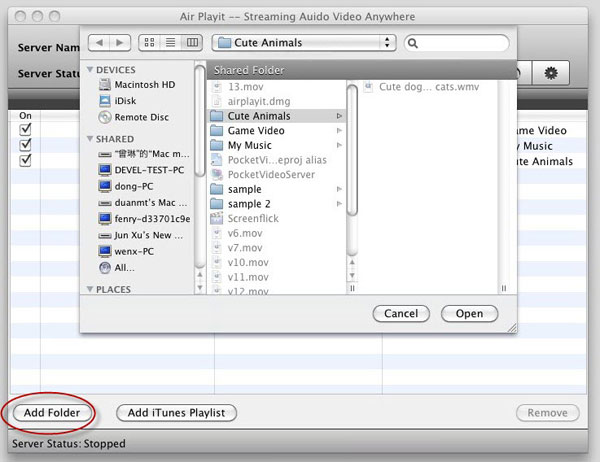
Step 1:Run the server and add the videos stored on your PC or Mac. Click “Shared folders” tab and then “Add Folder”, browse the video folder that you would like to transfer.
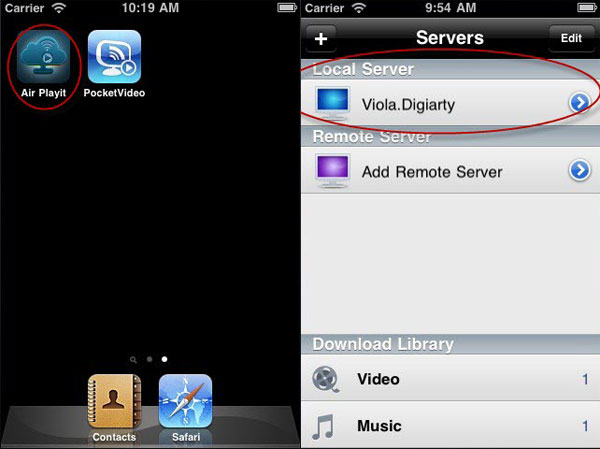
Step 2: Run the client app on your Apple device, add your server and tap it. Air Playit can discover the server on local network by Bonjour Service. If you want to add a remote server, you should first make sure you know the PIN and have access to the server and then fill the required information like IP address, Port, etc manually.
To transfer the video over Internet network, please pay attention to the requirements below:
* Your router should have a public IP address that is accessible from internet.
* Your router must support UPnP or NAT-PMP protocols so that Air Playit Server can setup the appropriate port forwarding. If your router supports none from these you will have to configure the port forwarding manually.
Tip: If you are still unable to connect to the server, then close the firewall for a try.
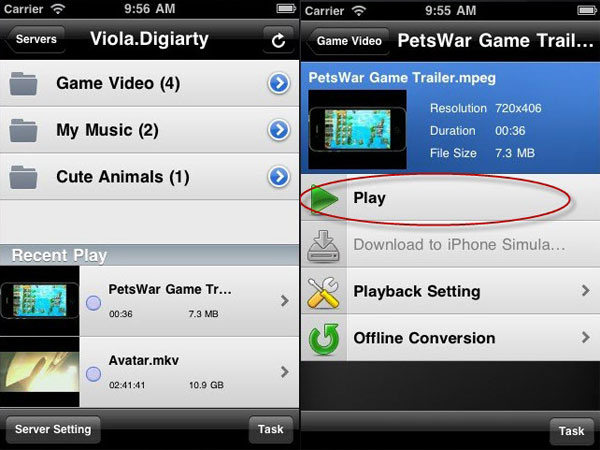
Step 3: Browse the folders under the server and tap the video folder which you want to transfer, click “Play”, and you finish all the steps to transfer video over Wifi, 3G or 4G Internet network to your Apple devices.
Related Article
How to Stream video to iPhone iPad with WiFi 3G 4G network
This article provides you a way of streaming video to iPhone iPad via 3G 4G network, such as AT&T 3G, Verizon etc; watch any video with iPhone iPad and air download video without waiting.
Remote Access Your Media Library – Streaming Video via 3G/4G
Air Playit is capable of remote streaming video audio to your iPhone iPad via 3G/4G network. It gives you instant access to the video library on your home computer when you're in the airport, café or anywhere you go."
Streaming Movie and Video to Android Phone via WiFi 3G 4G Network
Air Playit is the software that you need for streaming video and streaming movie to Andriod phone via wiFi 3G 4G network, download this free video streaming software and play the video and movies at any where wirelessly.
Category
Air Playit News
Tips on video streaming
Apple News
Music streaming

Top 5 Articles
* Top 3 Video Streaming Apps for iPad iPhone
* Access Movies from PC to iPad Wirelessly
* Video Streaming Software for Android Phone
Hot Search
Watch M2TS to iPhone, Stream MKV to iPhone, Stream MP3 music to iPhone, Streaming WMV to iPhone iPad, Watch AVI on iPhone, play MKV on iPhone iPad, streaming videos to iPhone iPad, streaming video to iPhone iPad, Streaming WMV video to iPhone iPad, free video streaming App, Remote access, WiFi Video on iPhone iPad, Air Playit Http server,Remote Video Streaming,streaming video audio to TV ,audio streaming software ,Transfer video