



How to Use Air Playit to Streaming Video Audio to TV
What average people do:
Watch Apple-approved videos (say, H.264, MOV, MP4, M4V files) on iPhone or iPad. If the video formats are not compatible with Apple devices, you have to spend some time converting them to the right format, and then sync to iPhone iPad via iTunes. Besides, the maximum capacity of iPhone and iPad must be seriously considered.
What fashionable people do:
Store video audio on PC/Mac hard drive, and access them via an app on your iPhone iPad iPod touch. Then you can watch videos on big screen TV instantly by connecting your iDevices with TV. No iPhone iPad iPod touch capacity limitation, no pre-conversion.
Exactly! To be fashionable, all you need is a video streaming app which supports TV-Out, like Air Playit. You can stream video audio to iPhone iPad iPod touch without doing any tedious and lengthy converting of these files beforehand. Then you transfer iPhone iPad iPod touch video audio to big screen TV via an Apple Composite AV Cable and simply watch video on a big screen.
What's Air Playit?
Air Playit is an all-in-one video streaming app for streaming video audio to iPhone iPad iPod touch immediately via Wi-Fi, 3G or 4G. Except Apple approved video formats, Air Playit is also capable of streaming MKV, AVI, FLV, M2TS, WMV, etc. to iPhone iPad iPod touch. Besides, this video streaming app supports iPhone iPad iPod touch TV-Out which helps users streaming video audio to TV with an Apple Composite AV Cable. With Air Playit, watching HD videos on big screen will be simple.
How to streaming video audio to TV with Air Playit?
Before streaming video audio to TV, you need to:
1. Download and install Air Playit server on PC/Mac.
2. Download Air Playit client and install on your iPhone iPad iPod touch.
3. Connect your iPhone iPad iPod touch with TV via Apple Composite AV Cable.
Step one: Run the server, click "Add Folder" to add video audio to "Sharing Folders".
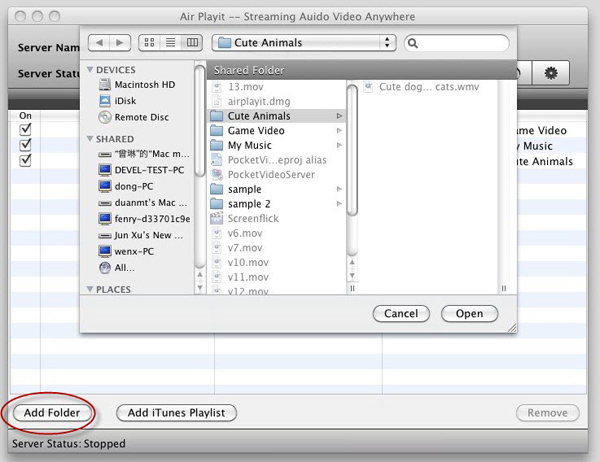
Tips: You need to add files under the "Shared Folder" on Windows OS, and under "Sharing Folder" on Mac OS. Air Playit server will stream the videos to TV from the folder.
Step Two: Launch Air Playit client on your iPhone iPad iPod touch and add your computer to the server list.
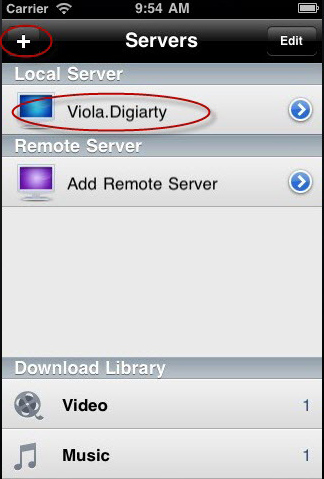
Step Three: Choose the video you want to watch and click "Play" on the iDevices. Streaming video to TV is on the go. You can watch video on big screen without waiting.
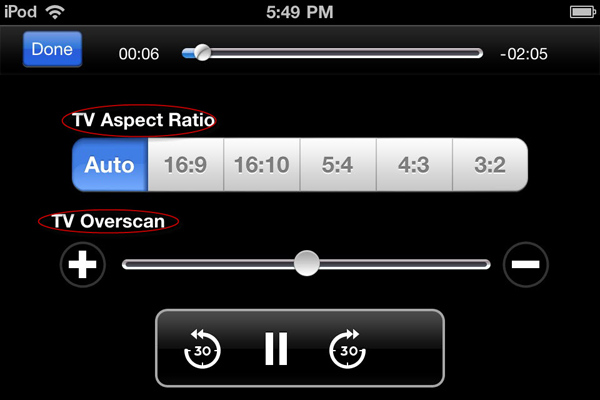
Now iPhone iPad iPod touch becomes a controller through which you can set the TV Aspect Ratio to fit your TV, or adjust TV Overscan to get perfect video watching enjoyment.
Recommended
WinX DVD Ripper Platinum can rip DVD to digital formats like MP4, H.264, AVI, WMV, MOV etc., backup DVD to a single MPEG2 file with no video/audio qulity sacrifice on Windows (10) PC/Mac. So that you can stream DVD movie to iPhone/iPad/TV with Air Playit perfectly.
For Windows 

For Mac 

Related Article
Streaming Video to Home TV with Air Playit Free iPhone iPad App
For Apple fans, watching favorite videos on iPhone iPad will be an extremely cool thing. Air Playit is a free iPhone iPad video streaming app that supports TV Out for streaming almost all videos to TV via iPhone iPad.
How to Streaming Videos to iPhone iPad
Just imagine, all of your videos are stored on your Mac or PC at home, and you access them via an app on your iPhone iPad. And instantly the capacity of your iPhone iPad becomes infinite. How to realize it? Here is your answer.
iPhone Remote Access Home Video Library
It brings a new introduction of how to use free iPhone App to remote access home video library. As a 100% free App, Air Playit is able to stream video library to iPhone via wifi, 3G or 4G wireless network to fulfill the remote access task.

Top 5 Articles
* Top 3 Video Streaming Apps for iPad iPhone
* Access Movies from PC to iPad Wirelessly
* Video Streaming Software for Android Phone
Hot Search
Watch M2TS to iPhone, Stream MKV to iPhone, Stream MP3 music to iPhone, Streaming WMV to iPhone iPad, Watch AVI on iPhone, play MKV on iPhone iPad, streaming videos to iPhone iPad, streaming video to iPhone iPad, Streaming WMV video to iPhone iPad, free video streaming App, Remote access, WiFi Video on iPhone iPad, Air Playit Http server,Remote Video Streaming,streaming video audio to TV ,audio streaming software ,Transfer video