



Watch and Download Video to iPhone iPad via WiFi
How to use WIFI to download videos free to iPhone/iPad? Direct download! But what if your iPhone is storage-strapped by photos and incapable of saving even 1M of videos? To connect iPhone iPad to a computer, you may either use a physical USB port coordinating with iTunes or a wireless WIFI connection. If you choose the latter and want to watch computer videos – whether they've been purchased, converted, or ripped from DVD – on iPhone iPad, Air Playit will make things less hassle for you to enjoy videos on iPhone iPad without storage limitation from Windows or OS X.
Air Playit is an free app available for both Windows and Mac in the App Store that provides a method of accessing your computer over WiFi.
Air Playit is able to convert videos on the fly and stream videos to iPhone, iPad, iPod Touch over local network, even internet. You can watch any video immediately without doing any tedious and lengthy conversion of these files before hand. Moreover, it acts as a remote video converter software. With the built-in offline task manager, you can add and manage video conversion tasks on your iPhone iPad, and download the videos to your devices via WiFi.
How to Watch and Download Video to iPhone via WiFi
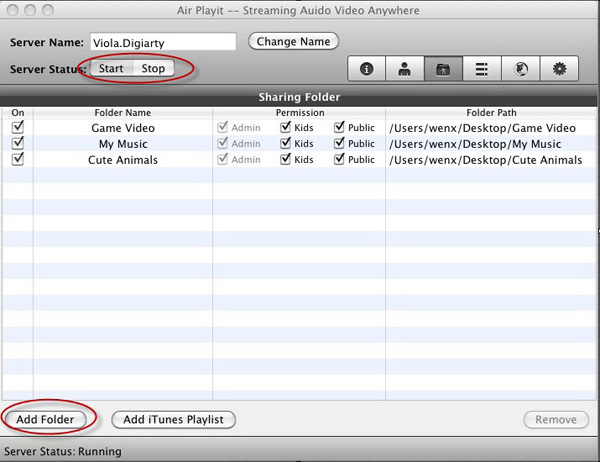
Step one: Firstly, download & install Air Playit server to PC or Mac, and Air Playit client on iPhone/iPad. Run the Air Playit server. Make sure the server is in Start condition. You can add your video by clicking "Add Folder" so that you can stream the video to your iPhone iPad via Air Playit server.
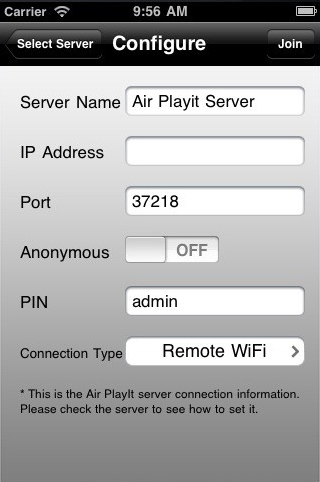
Step Two: Run the Air Playit App that has been installed on your iPhone iPad. Connect with WiFi, it can automatically search your server by Bonjour Service. If the App can't find the server, you can add the server IP address manually. (Get the IP on the main interface Air Playit server).
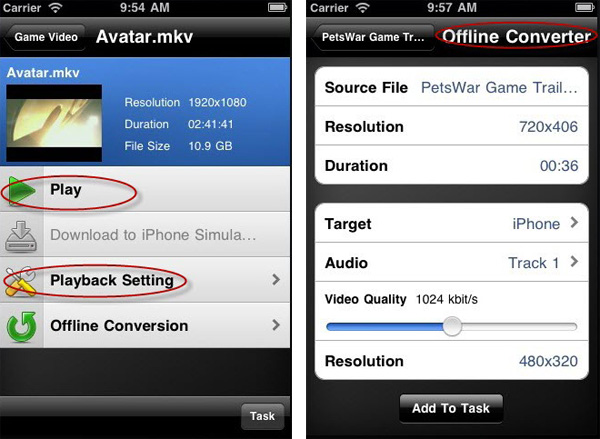
Step Three: Browse the folders under the server, click "Play" to watch video on iPhone via WIFI without follow-up format conversion. The built-in offline task manager makes it as a remote video converter. You can add video conversion tasks on your iPhone iPad, and then the converted video can be downloaded to portable devices for you to watch without the need of network connection.
Note: With Air Playit, you can free stream and watch computer videos in MKV /M2TS/Divx/Blu-ray movies etc as large as 2G on iPhone/iPad smoothly everywhere at home.
Recommended

WinX DVD Ripper Platinum can rip DVD to digital formats like MP4, H.264, AVI, WMV, MOV etc., backup DVD to a single MPEG2 file with no video/audio qulity sacrifice on Windows (10) PC/Mac. So that you can stream DVD movie to iPhone/iPad/TV with Air Playit perfectly.
For Windows 

For Mac 

Related Article
Air Playit Review – Video Audio Streaming Software for iPhone iPad
Air Playit is a powerful & free video audio streaming software for iPhone iPad which helps you remotely play almost all videos audios on iDevice without conversion and sync by streaming video audio to iPhone iPad via WiFi/3G/4G network.
Watch AVI Video on iPhone & iPad without Conversion
Here I will introduce you a more efficient way to watch AVI video on iPhone iPad by using Air Playit. Air Playit is a free video streaming software which is specialized in streaming videos audios to iPhone, iPad, iPod touch from PC & Mac without the third-party converting software and iTunes.
How to Stream Video to iPhone iPad with WiFi 3G 4G Network
Are you tired of converting the videos before you can sync them to iPhone iPad? Now a free application Air Playit provides exactly what you need- streaming video to iPhone iPad with WiFi 3G 4G network.

Top 5 Articles
* Top 3 Video Streaming Apps for iPad iPhone
* Access Movies from PC to iPad Wirelessly
* Video Streaming Software for Android Phone
Hot Search
Watch M2TS to iPhone, Stream MKV to iPhone, Stream MP3 music to iPhone, Streaming WMV to iPhone iPad, Watch AVI on iPhone, play MKV on iPhone iPad, streaming videos to iPhone iPad, streaming video to iPhone iPad, Streaming WMV video to iPhone iPad, free video streaming App, Remote access, WiFi Video on iPhone iPad, Air Playit Http server,Remote Video Streaming,streaming video audio to TV ,audio streaming software ,Transfer video